
Cigati Yahoo Email Backup Tool21.9 - Download
You'll be able to download in few seconds.
Publisher Description
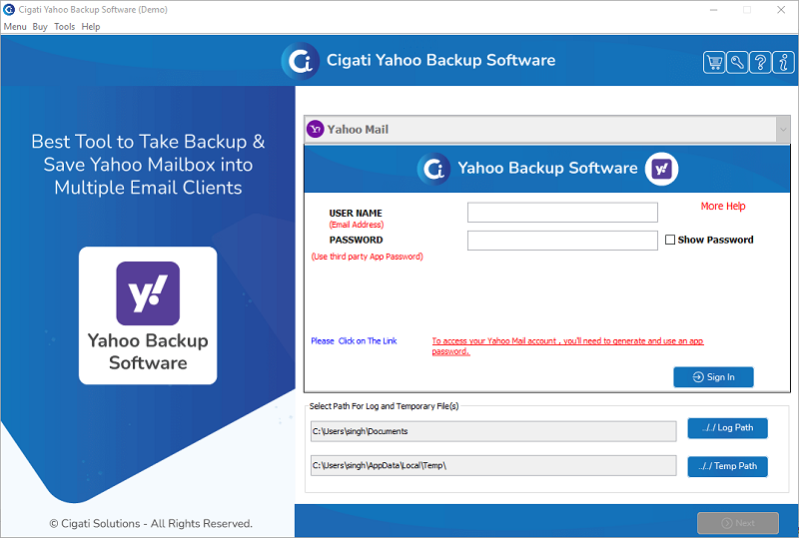
Cigati Yahoo Email Backup Tool is an advanced and secure utility to convert and migrate Yahoo email by ensuring high data integrity. The latest update of this software facilitates users to Free up server space after migration and also allows a feature to skip previously migrated items. Using this advanced Yahoo Email Backup Software, you can easily export Yahoo emails to your system by converting them into PDF, PST, MBOX, MSG, HTML, DOC, etc. Moreover, you can directly migrate the Yahoo emails into various popular email clients such as Gmail, Office 365, Thunderbird, AOL, Live Exchange, etc. To backup Yahoo email you need to download and run it as an administrator. After that, it opens the initial interface where you need to enter the login credentials. Remember to generate a third-party app password, it is essential to Sign in to your Yahoo account. From the next wizard, you can select the desired folders that you want to backup from the left panel. Now, click on the Next button to proceed ahead. From the dropdown of the Save/Backup/Migrate As, select the resultant file formats or email clients where you want to backup Yahoo emails. Additionally, this Cigati Yahoo Backup Software offers some advanced features in this wizard that help users to optimize the overall backup process. You can select the necessary options including the Mail Filter option. This Mail Filter feature allows users to select the specific folder within a particular date range for the backup and migration process. After that provide the Custom Folder Name to the resultant folder and define the Destination Path. Now, click on the Convert button to start the Backup Yahoo Email process. In the end, it shows the report of the entire task. You can also download this report by selecting the Download report option. This updated Yahoo Email Backup Tool also provides the free trial version to analyze its advanced functionalities. Users can only backup the first 50 emails per folder with this free version.
About Cigati Yahoo Email Backup Tool
This File & Disk Management program is available in English. It was last updated on 02 November, 2026. Cigati Yahoo Email Backup Tool is compatible with the following operating systems: Windows, Windows-mobile.
The company that develops Cigati Yahoo Email Backup Tool is Cigati Solutions. The latest version released by its developer is 21.9.
The download we have available for Cigati Yahoo Email Backup Tool has a file size of 131.1 MB. Just click the green Download button above to start the downloading process. The program is listed on our website since 2022-04-12 and was downloaded 0 times. We have already checked if the download link is safe, however for your own protection we recommend that you scan the downloaded software with your antivirus. Your antivirus may detect the Cigati Yahoo Email Backup Tool as malware if the download link is broken.
How to install Cigati Yahoo Email Backup Tool on your Windows device:
- Click on the Download button on our website. This will start the download from the website of the developer.
- Once the Cigati Yahoo Email Backup Tool is downloaded click on it to start the setup process (assuming you are on a desktop computer).
- When the installation is finished you should be able to see and run the program.
Program Details
System requirements
Download information
Pricing
Version History
version 21.9
posted on 2022-04-12
Supports all versions of Windows OS included Windows 11.
version 21.1
posted on 2021-03-31
Support all version of Windows OS
Disclaimer
External Download
We do not host Cigati Yahoo Email Backup Tool on our servers. We did not scan it for viruses, adware, spyware or other type of malware. This app is hosted by the software publisher and passed their terms and conditions to be listed there. We recommend caution when installing it.
The external download link for Cigati Yahoo Email Backup Tool is provided to you by apps112.com without any warranties, representations or guarantees of any kind, so access it at your own risk.
If you have questions regarding this particular app contact the publisher directly. For questions about the functionalities of apps112.com contact us.
